

I. Purpose
Help staff add customer information to an order so the restaurant can maintain the customer’s transaction history and review their dining preferences.
Customer records help restaurants provide personalized service, offer relevant promotions and discounts, and track outstanding balances. Staff can select an existing customer, create a new customer record, or update customer information as needed.
II. Tutorial Video
Watch the tutorial video for detailed instructions: https://www.youtube.com/watch?v=9HkBxH4cZ94
III. Instruction Steps
1. Add Customer Information to an Order
- On the Order entry screen, select Customer.

- Search for an existing customer by entering information such as their name, phone number, or ZIP code, then select the appropriate customer.

- For a first-time customer, tap the add customer icon and enter their information to create a new customer record.
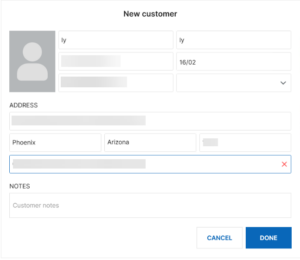
- For a first-time customer, tap the add customer icon and enter their information to create a new customer record.
- Tap Done to confirm.

The selected customer is added to the order.
Note: If the customer’s information is incorrect, select Customer, tap the edit icon, and update the information. Then tap Done to save.
2. View Customer Details
After selecting a customer, staff can quickly review their total spending and number of visits.
To view more information:
- Tap View details.
- Review the customer’s dining history, including:
- Frequently ordered items
- Spending per visit
- Most recent visit
- To update the customer’s information, tap Edit and make the necessary changes.

Have a nice day!


