

Nội dung có trong bài
Ẩn
I. Purpose
This feature allows restaurant managers to define the capacity (number of seats) for different table types and set the average duration each table is expected to be occupied.
II. Instruction Steps
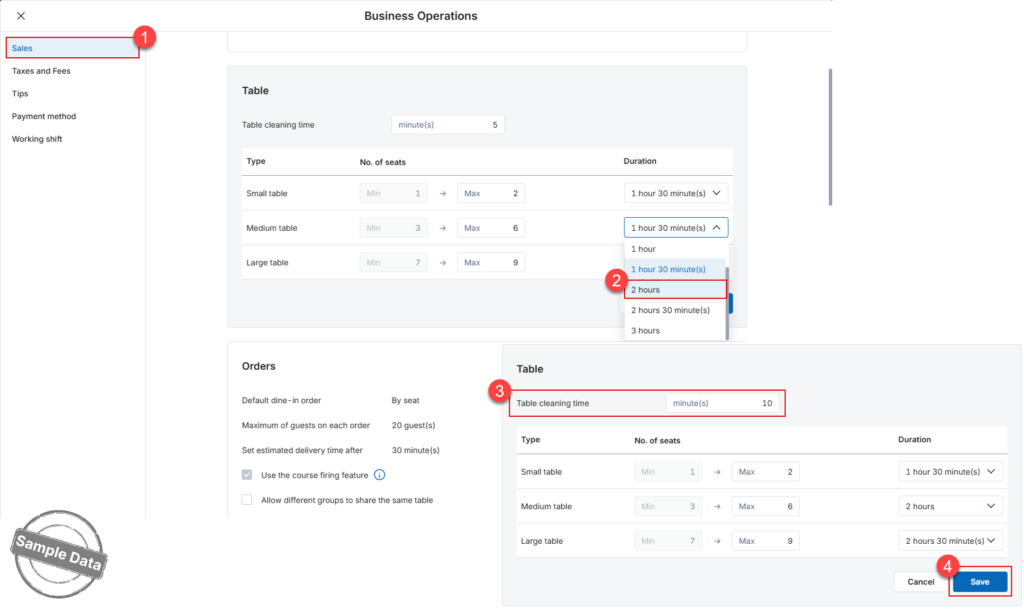
- Go to the dashboard → Settings → Sales → scroll down to the Table section.
- Configure Table Capacity and Duration
In the table configuration grid, you can define the following for each table type (Small, Medium, Large, etc.):- No. of seats: Set the minimum (Min) and maximum (Max) number of guests allowed for that table type.
- Duration: Select the average time the table will be occupied from the dropdown menu (e.g., 1 hour 30 minutes).
- In the Table cleaning time field, enter the number of minutes required to clean and reset the table before it can be used by the next guest.
- Click Save to apply the settings.
Note: These settings help the system intelligently manage reservation slots and prevent overbooking based on your actual table capacity and service speed.


