

Nội dung có trong bài
Ẩn
I. Purpose
The managers can decide which types of order changes will (or will not) print a kitchen chit after the cashier/server resends the ticket to the kitchen or bar.
II. Instruction steps
- On the dashboard, go to Settings –> Sales.
- On the Sales tab, scroll to Kitchen part and click edit icon.
- Check or uncheck the order changes you want to apply.
- Click Save.
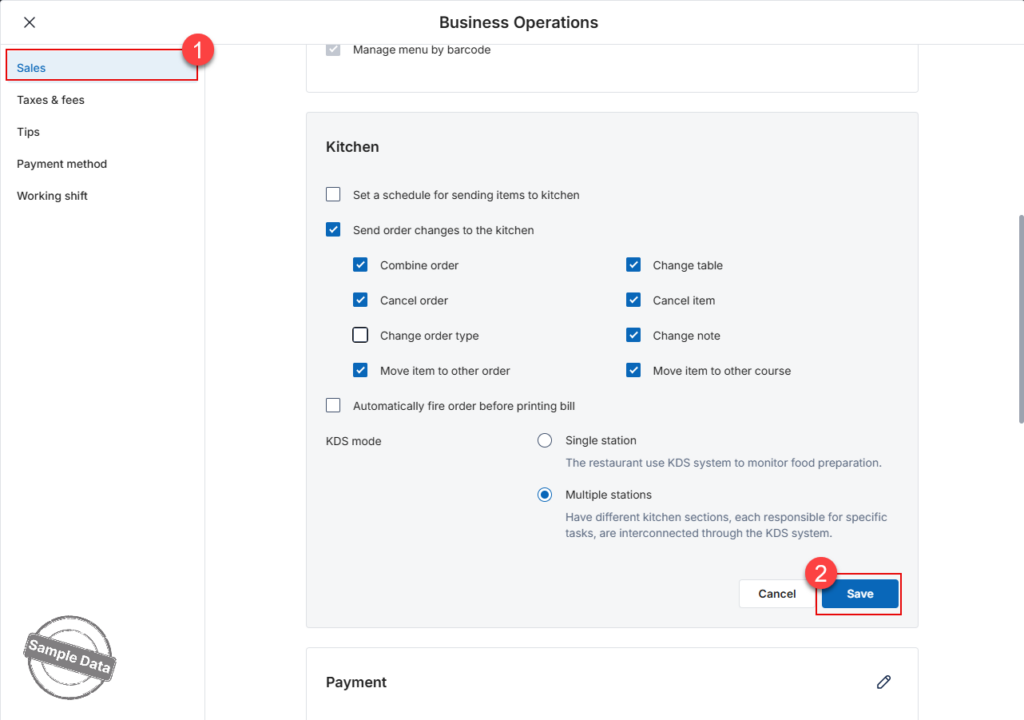
Notes:
- New items
When new dishes are added to an order, a New-Item chit is always printed—this setting is independent of the change-event options above. - Mixed scenarios
If the cashier adds new items and performs other change actions that you have opted not to print, the kitchen receives only the New-Item chit; no separate change chit is generated.
Have a nice day!


