

Nội dung có trong bài
Ẩn
I. Purpose
This deployment model is designed for medium to large-sized restaurants operating under Quick Service or Full Service models, where:
- The restaurant has multiple areas located close together
- Daily order volume ranges from 100–200 orders per day
- Multiple staff devices are required to support operations
This configuration ensures stable performance, better order distribution, and efficient coordination between front-of-house and kitchen operations.
II. Instruction Steps
1. Prepare Required Devices
For this model, the recommended device configuration includes:
- 1 POS Main device (Android)
- 1 POS Sub device (for additional cashier or service station)
- 1–2 Tablets (for staff/KDS)
- 1 Kitchen printer or KDS device
Total recommended devices: 2–4 devices, depending on operational needs.
This setup supports higher order volume and multiple service points.
2. Set Up Internet Connection
To ensure smooth system operation:
- Install one modem/router to receive the internet connection from the service provider.
- Connect all staff devices (POS Main, POS Sub, Tablets, Kitchen printer/KDS) to the same modem.
- Guest devices (phone/tablet for ordering) should also connect to the same network if applicable.
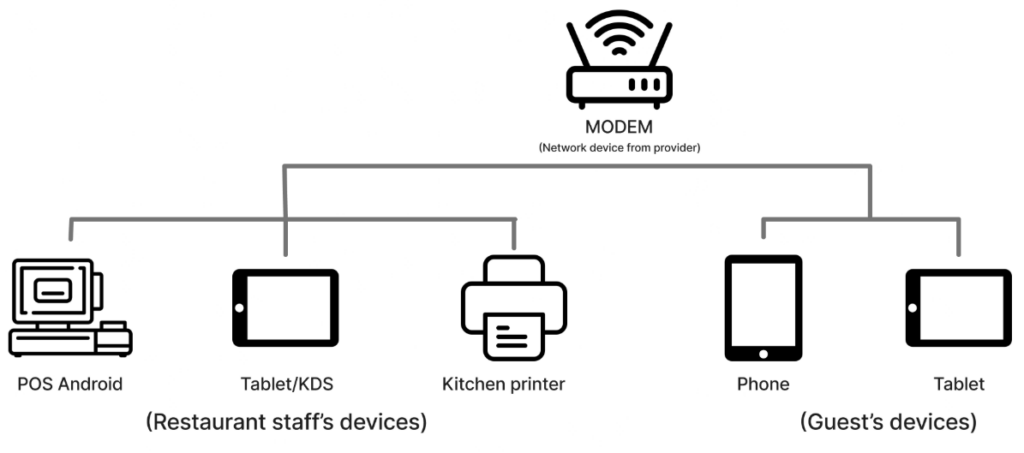
This ensures proper synchronization between POS, kitchen, and ordering channels.
Have a nice day!


