

Nội dung có trong bài
Ẩn
I. Purpose
The cashier can collect an additional fee whenever a guest pays the bill by credit or debit card.
II. Instruction Steps
- On the dashboard, go to Settings → Sales
- Go to the Taxes & fees tab.
- Scroll to Payment method pricing → click Edit.
- Check Payment method pricing and select Non-cash Adjustment:
- By % bill:Select this radio button to charge a percentage of the bill. Enter the rate.
- By amount: Select this radio button to charge a fixed amount per bill. Enter the value.
- Rename: Change the label that appears on the POS and receipts.
- Not displayed on the secondary screen, receipts…: Tick if you do not want the surcharge line to show on the customer-facing display or printed receipts.
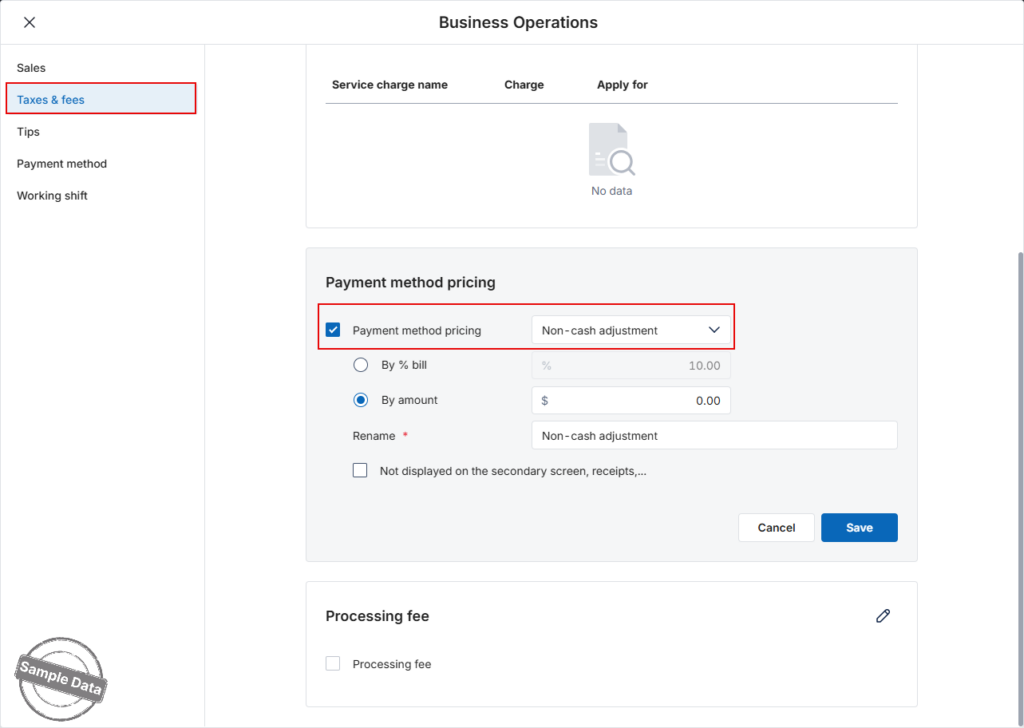
Click Save to apply, or Cancel to discard.
Have a nice day!


