

Nội dung có trong bài
Ẩn
I. Purpose
The owner/manager can define which bill components are included when CukCuk suggests a tip amount, so the calculation matches the restaurant’s policy and guest expectations.
II. Instruction Steps
- On the dashboard, go to Settings –> Sales.
- Select Tips tab, scroll to Tip rule –> click Edit button
- In the pop-up, tick the items you want the tip suggestion to be based on:
Tax Adds the tax amount to the calculation base. Gratuity Includes any compulsory gratuity already on the bill. Service charge Counts the service-charge line (if applied). Non-cash adjustment Adds the card-surcharge amount (ignored on Kiosk).
The tip guide is calculated as:
Tip suggestion = %Tip × (Subtotal − Discount + Selected Components)
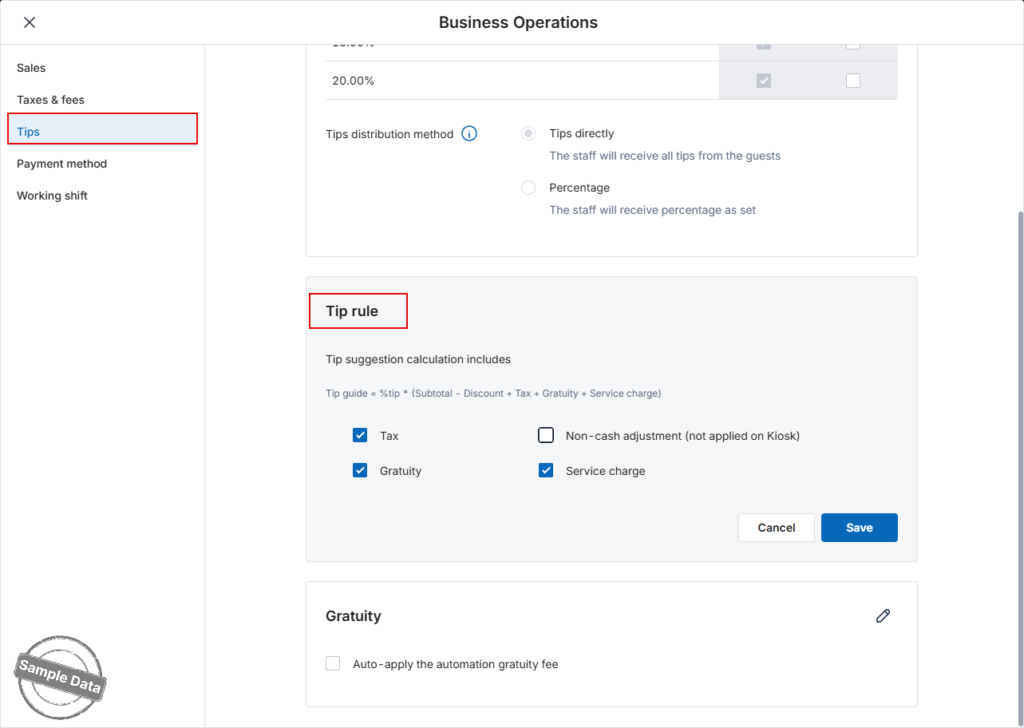
Click Save to apply, or Cancel to discard.
Have a nice day!


