1. Trang chủ
  2. Other Settings
  3. Online Ordering
  4. Enable Flute Payments for Online Ordering
  1. Trang chủ
  2. Payment Management
  3. Enable Flute Payments for Online Ordering

Enable Flute Payments for Online Ordering

Nội dung có trong bài Ẩn

I. Purpose

This setup allows restaurants to accept credit card payments via Flute Payments for Online Ordering. 

II. Instruction steps

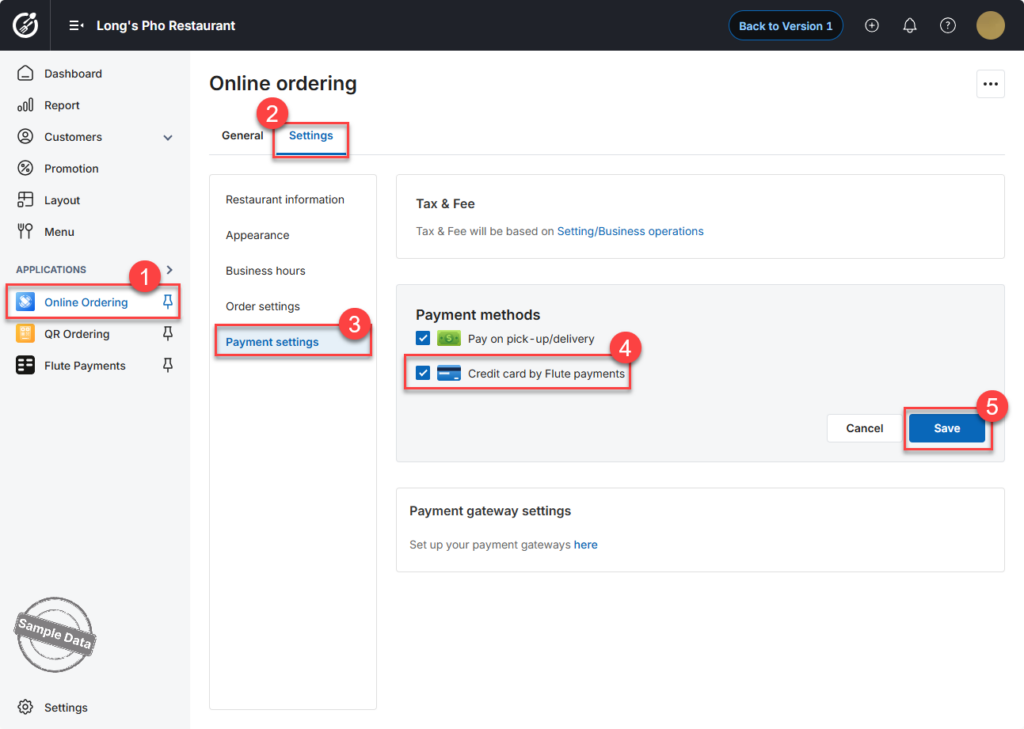
  1. Go to Online Ordering.
  2. Open the Settings tab.
  3. Select Payment Settings.
  4. Check Credit card by Flute Payments.
  5. Click Save to apply the changes.

Have a nice day!

Cập nhật 16/07/2026

Hãy giúp chúng tôi hoàn thiện trang trợ giúp phần mềm. Bài viết này có hữu ích với bạn không?

Bài viết liên quan

Set up orders on Online Ordering
Xem thêm more
Set up payments on Online Ordering
Xem thêm more
Set up Appearance on Online Ordering
Xem thêm more
Set up Business hours on Online Ordering
Xem thêm more
Set up menu for Online Ordering
Xem thêm more
Enable Flute Payments for QR Ordering 
Xem thêm more