

I. Purpose
Allow customers to check their loyalty points and available rewards by accessing the restaurant’s Loyalty page. The restaurant can share the page link or display its QR code at the checkout counter so customers can easily scan, register, and access their accounts.
II. Instruction Steps
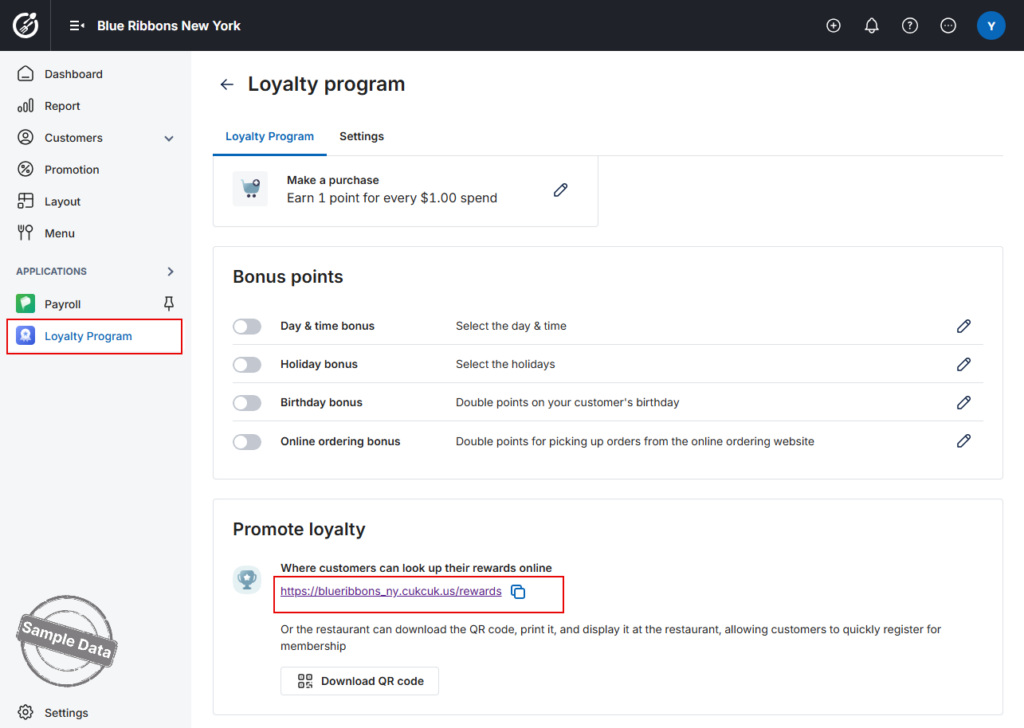
- On the management site, go to Loyalty app.
- In Promote loyalty, copy the page link or click Download QR Code to download the QR code.
- Share the link with customers or display the QR code at the checkout counter.
2. Register for a Loyalty Account
- Enter the customer’s phone number.
- Select I’m not a robot.
- Click Register.

- Enter the customer’s name, email address, and date of birth.
- Click Register to complete the registration.

3. Check Loyalty Points and Rewards
- Enter the customer’s phone number.
- Click Log in.

- The customer can view their total loyalty points.

3.1 View and Redeem Rewards
- In the Feature section, click Redeem to view the available rewards.

- Select the reward the customer wants to redeem.
- Review the reward conditions and click Redeem.

If the customer wants to use the reward immediately:
- Click Use.

- Display the QR code for the cashier to scan.

If the customer does not want to use the reward immediately, skip this step.
3.2 View How to Earn Points
- Click How to earn points.

- The customer can view details of the available point-earning programs.

3.3 View Point Activity
- Click Activity.

- The customer can view the details of their point-earning and point-redemption history.

The Loyalty page is now ready for customers to register, check their points, view available rewards, and track their loyalty activity.
Have a nice day!


