

Nội dung có trong bài
Ẩn
I. Purpose
The restaurants can auto-confirm QR orders so that eligible tickets go straight to the kitchen without any staff interaction.
II. Instruction steps
On the dashboard, go to QR Ordering app. Select Order settings at Settings tab.
Click Edit –> Check Automatically confirm and send orders to the kitchen.
-
- All orders: Every QR order is confirmed instantly and routed to the kitchen, even if the guest has not paid yet (payment happens at the POS or when the bill is closed).
- Paid orders: Only orders that are pre-paid online are auto-sent to the kitchen. Unpaid orders stay in the POS Pending list for staff review.
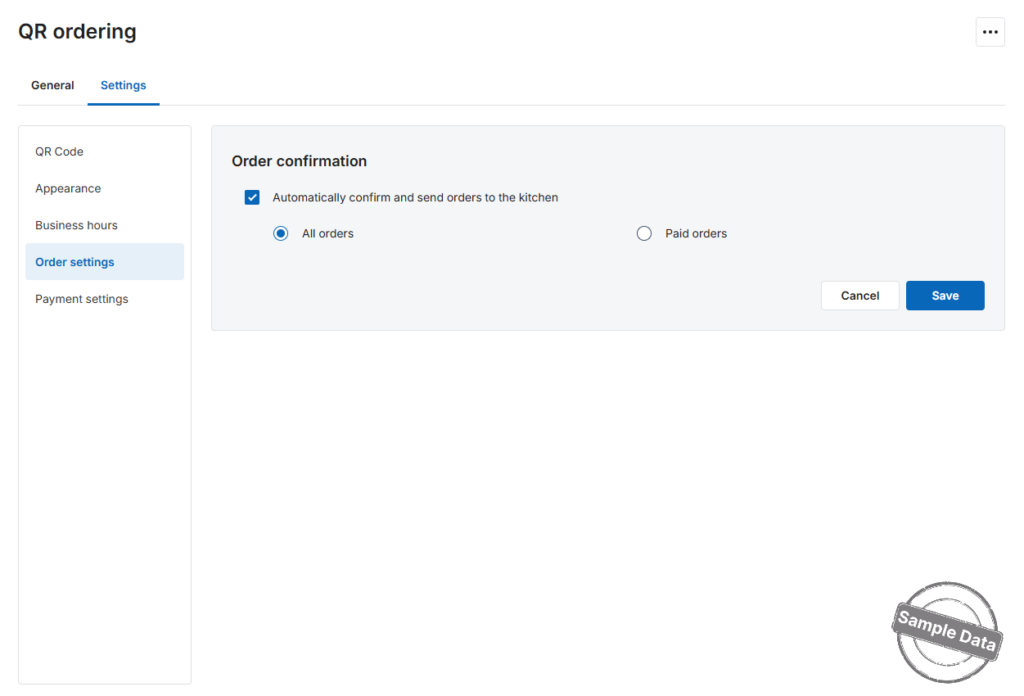
Click Save to activate the rule, or Cancel to discard.
Have a nice day!


