

The dashboard gives you real-time insight into key figures on the POS. It now contains five widgets instead of four.
I. Main Areas on the Dashboard
Dashboard Widgets
| Area | Quick Description |
|---|---|
| Activity summary | Snapshot of NET Sales, Orders, Transactions, Refunds up to the current moment. |
| Sales trend | Line-chart tracking revenue trends for the day or the selected date range. |
| Top selling items | List of dishes with the highest quantity sold, helping you fine-tune the menu promptly. |
| Payment methods | Revenue breakdown by payment type (Cash, Card, Gift Card, etc.). |
| Order types | Distribution of revenue and order count by service channel (Dine-in, Delivery, Takeaway, Online-order, etc.). |
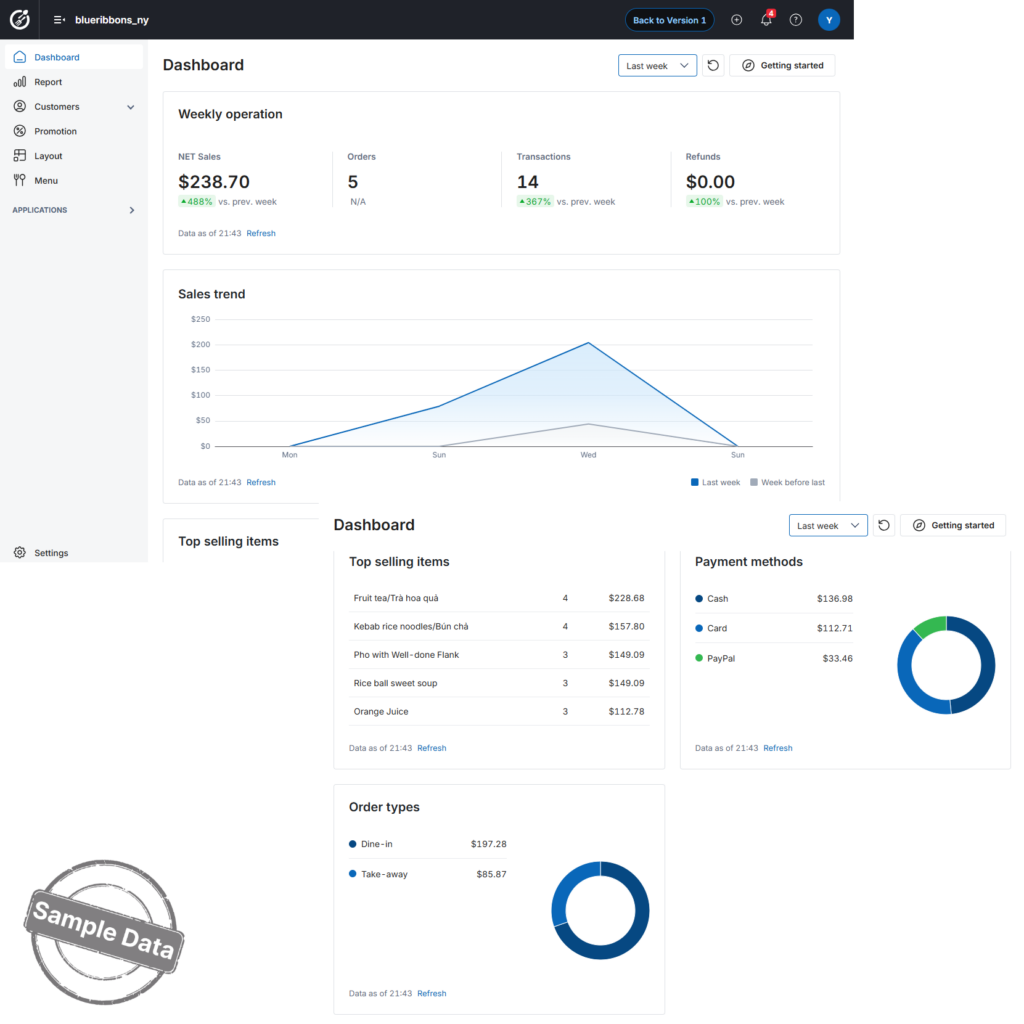 All widgets auto-refresh throughout the day. Click the Refresh link in any widget to pull the latest figures on demand.
II. How to Use the Dashboard
1. Select a Date Range
- Use the Today dropdown (top-right) to switch to Yesterday, This week, etc.
- Every widget immediately updates to match your selection.
2. Refresh Data
- Click the Refresh icon beside the date picker to reload every widget at once, or use the Refresh link inside a single widget to update just that block.
3. Drill Down into Details
| Metric / Widget | How to view details |
|---|---|
| NET Sales / Orders / Transactions / Refunds | Show the detailed report. |
| Sales trend | Hover over the chart to see exact revenue at each time point. |
| Top selling items | List top selling items. |
| Payment methods | Click a bar / pie segment to list orders paid with that method. |
| Order types | Click a bar / pie segment to filter orders by channel (e.g., only Delivery orders). |
Have a nice day!


