

Nội dung có trong bài
Ẩn
I. Purpose
This feature enables restaurants to integrate Tyro Online into their system, allowing customers to pay securely using credit cards directly through the online ordering platform. This integration streamlines the payment process, reduces manual transaction handling, and provides a seamless checkout experience for online guests.
II. Instruction Steps
1. Connect to Tyro Online
- On the management site, go to Applications.
- Find the Tyro application and click Install.
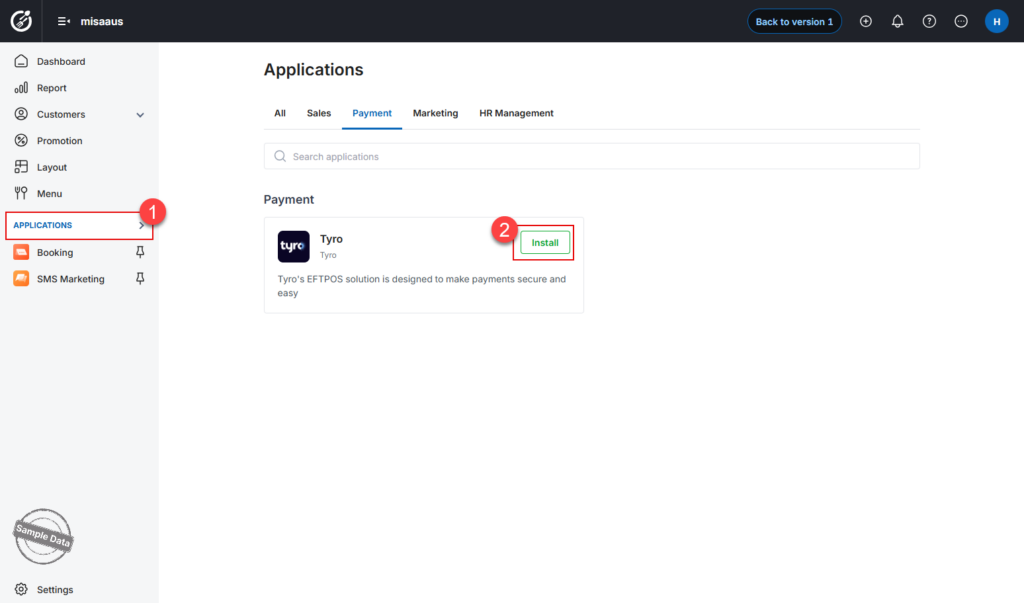
- Enter the Location ID provided to your restaurant by Tyro.
- Click Connect to establish the connection.
Note: If the restaurant wishes to disconnect, go to the Tyro app and select Uninstall.
2. Pay via Tyro Online
- On the online sales page, after clicking pay and filling in all the order information, the customer can select Credit card as the payment method.
- Click Continue to payment.

- Enter the card details and click Pay now.

Have a nice day!


