

Nội dung có trong bài
Ẩn
I. Purpose
Allow chain managers to add branches, select the license option for each branch, and configure location details, contact information, and time zone.
II. Instruction Steps
On the dashboard, go to Settings → Locations –> click Add location.
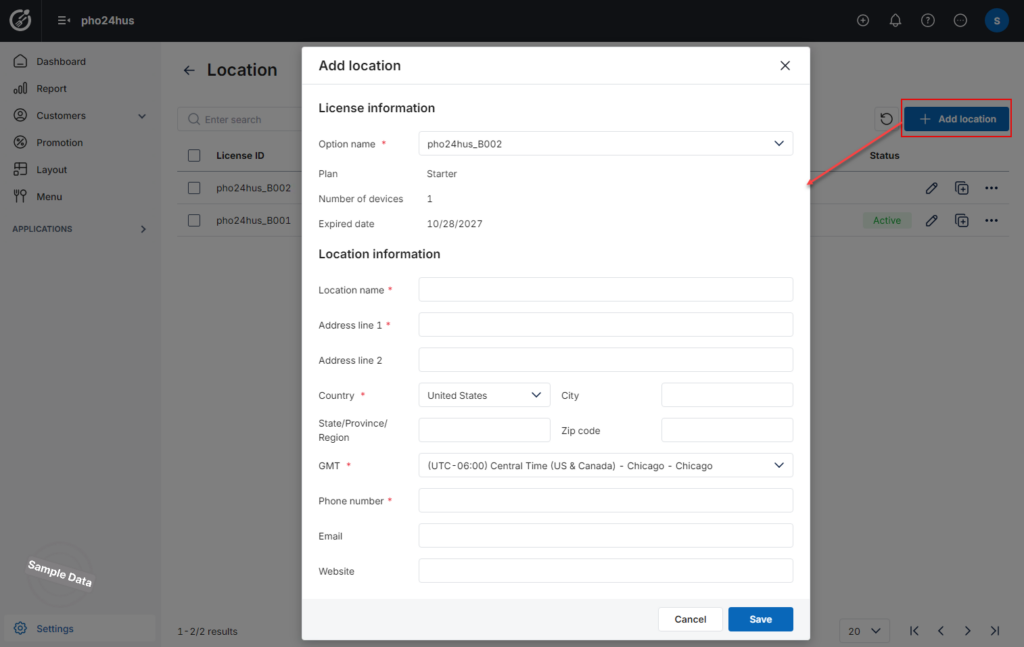
Under License information:
- Select the appropriate license option from the Option name dropdown.
- Review the associated license details:
- Plan: The subscription plan.
- Number of devices: The number of devices included in the license.
- Expired date: The license expiration date.
Under Location information, complete the following fields:
Required information:
- Location name: Enter the branch name.
- Address line 1: Enter the branch’s primary address.
- Country: Select the country where the branch is located.
- GMT: Select the branch’s time zone.
- Phone number: Enter the branch’s contact phone number.
Additional information:
- Address line 2: Enter additional address details, if needed.
- City: Enter the city.
- State/Province/Region: Enter the state, province, or region.
- Zip code: Enter the postal code.
- Email: Enter the branch’s email address.
- Website: Enter the branch’s website address.
Note: Fields marked with a red asterisk (*) are required.
After that, review the selected license option and location information. Click Save to create the branch, or Cancel to discard your changes.
The new branch is added to the Locations list.


