

I. Purpose
This deployment model is designed for large-sized full-service restaurants with:
- Approximately 200 orders per day
- More than 4 operational devices
- Multiple service areas and higher transaction volume
The purpose of this setup is to:
- Ensure stable and high-performance system operation
- Separate internal staff network and guest Wi-Fi for better security
- Support multiple POS stations, tablets, and kitchen devices
- Maintain smooth synchronization across all restaurant devices
II. Instruction Steps
1. Prepare Required Devices
For this model, the recommended device configuration includes:
- POS Main (Android)
- POS Sub
- Tablet / KDS devices
- Kitchen printer(s)
The total number of devices should be more than 4, depending on the restaurant size and operational needs.
2. Set Up Internet Infrastructure
Step 1: Install Modem
- Install 1 modem to receive the internet connection from the service provider.
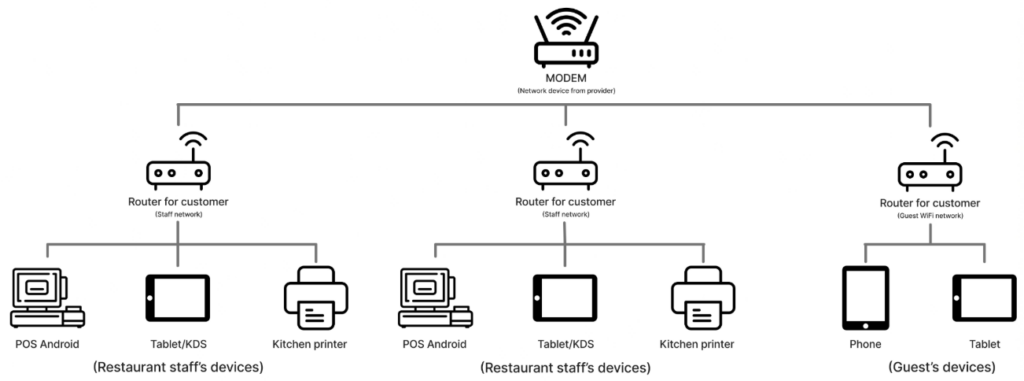
Step 2: Install Routers
- Install at least 2 routers connected to the modem:
- 1 Internal Router for restaurant staff devices
- 1 Customer Router dedicated for guest Wi-Fi
3. Connect Devices Properly
- All staff devices (POS Main, POS Sub, Tablets, Kitchen printers) must connect to the internal router.
- All guest devices (phones, tablets) must connect to the customer-designated router.
This separation ensures:
- Better network stability
- Higher data security
- Reduced risk of system interruptions
The system is now configured to efficiently handle large-sized restaurant operations with higher order volume and multiple devices.
Have a nice day!


